
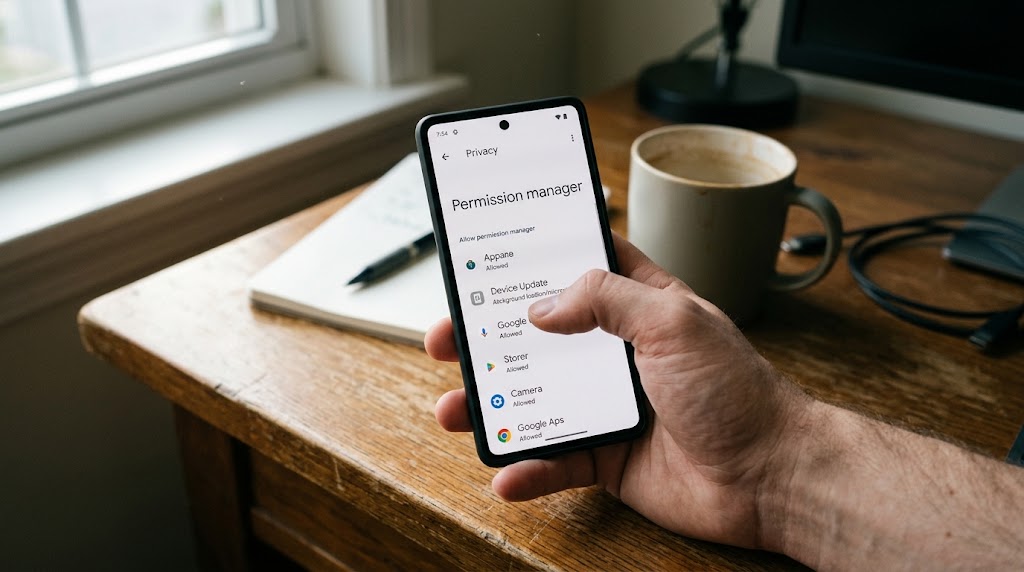
You noticed something off. The battery drains faster than it used to. An app you don’t remember installing sits in your settings. Or someone knows details about your schedule you never shared. Now you’re wondering, “Am I being tracked?” and the thought alone is unsettling.
This guide walks through the real signs of a tracked phone, the step-by-step checks you can run on Android and iPhone right now, what to do if you find something, and how to protect yourself going forward. I’ve kept it practical and honest, because the internet is full of paranoid checklists that mistake a slow phone for a spy operation, and that doesn’t help anyone.
Why this page exists on a monitoring site
Fair question. SpyHuman makes a phone monitoring app, so why publish a guide on detecting and stopping tracking?
Because we believe monitoring is only acceptable when it’s lawful and consent-based—a parent overseeing a minor child’s device or an employer monitoring company devices with disclosure. Covert surveillance of another adult is illegal, harmful, and something we explicitly prohibit in our Lawful Use Policy. If someone is using any tracking tool against you without your knowledge, you deserve to know and to stop it. That’s true whether the tool is ours or anyone else’s.
Am I being tracked? Common false alarms to check first
A slow, hot phone with battery drain is the most common false alarm. Most of the time the cause is a background-heavy app like a social media platform, a misconfigured email sync, or an overdue operating system update. Before you jump to conclusions, check the boring explanations first.
Go to Settings, then Battery, and look at what’s consuming the most. If Facebook, Instagram, or Google Photos is eating 30 percent of your battery in the background, that’s your answer, and it has nothing to do with surveillance.
Similarly, targeted ads don’t mean your phone is tapped. Ad networks track you through cookies, app identifiers, and browsing history, not through a microphone. It feels creepy, but it’s marketing technology, not spyware.
Start with these checks. If the boring explanations don’t fit, keep reading.
Am I being tracked? Real signs your phone is monitored
These are the indicators that actually matter, in order of seriousness:
- An unfamiliar app in your app list or running processes, especially one with a generic name like “System Service,” “Phone Manager,” or “Device Health,” that you don’t recognize and didn’t install. This is the strongest single sign. Monitoring apps need to be installed on the device to work, and they often disguise themselves with bland names.
- Unusual data consumption. A monitoring app that sends call logs, messages, location, and screenshots to a remote dashboard uses data constantly. If your mobile data usage has jumped with no change in your habits, check which apps are using the most data in Settings.
- Battery drain that doesn’t match your usage. A tracking app running in the background uses GPS, microphone access, and the network constantly. That hits the battery harder than normal apps. But again, rule out the common causes first.
- The phone is taking longer to shut down than it used to. Some monitoring apps need to finish transmitting data before the phone powers off, which can add a delay.
- Strange SMS messages or notifications that appear and vanish. Some older monitoring tools use SMS commands for configuration, and a flash of an odd text can be a sign.
- Someone knowing things they shouldn’t. This is the human sign, not the technical one, and it’s often the first thing people notice. If a person repeatedly knows where you were, who you spoke to, or what you messaged, and you didn’t share that information, the leak might be your phone.
How to check if am I being tracked on Android (step-by-step)
Android is the more common target for monitoring apps because it allows sideloading (installing apps from outside the Play Store). Here’s how to look:
- Review the App List: Open Settings and go to Apps (or Application Manager on some phones). Scroll through every app, including system apps (you may need to tap “Show system apps” or “Show all apps”). Look for anything you don’t recognize. If you see something unfamiliar, search its name online before deleting, since some are genuine system processes. Monitoring apps often use names like “System Update,” “Phone Monitor,” “Sync Manager,” or something equally forgettable.
- Check Device Admin Rights: Check Settings, then Security, then Device Admin Apps (the exact path varies by manufacturer). Monitoring tools sometimes register themselves as device administrators to prevent easy uninstalling. If something you don’t recognise has admin rights, that’s a strong flag.
- Inspect Unknown App Installation: Check Settings, then Apps, then Special Access, then Install Unknown Apps. This shows which apps have permission to sideload other apps. If Chrome, a file manager, or anything unexpected has this permission turned on, someone may have used it to install a monitoring app from outside the Play Store.
- Audit Location Access: Go to Settings, then Location, then App Location Permissions. Review which apps have “Allow all the time” location access. A monitoring app needs continuous location, so it will be here.
- Check Google Account Sessions: Check your Google account at myaccount.google.com, then Security, then Your Devices. Look for devices or sessions you don’t recognize. Also check Recent Security Activity for unfamiliar sign-ins.
- Scan with Play Protect: Run a scan with Google Play Protect. Open the Play Store, tap your profile, then Play Protect, and run a scan. It specifically flags monitoring and stalkerware apps.
How to check if am I being tracked on iPhone
iPhones are harder to monitor without physical access, but not impossible.
- Check Profiles & MDM: Check Settings, then General, then VPN and Device Management (or Profiles and Device Management on older iOS). If you see a profile you didn’t install, especially a Mobile Device Management (MDM) profile, that’s how enterprise monitoring works, and if you’re not on a company phone, it shouldn’t be there.
- Review Location Permissions: Check Settings, then Privacy and Security, then Location Services. Review which apps have “Always” location access. Question anything you don’t recognize.
- Audit Apple ID Devices: Check your Apple ID at appleid.apple.com, then Devices. Every device signed into your account appears here. If you see something you don’t own, remove it. Also check if Family Sharing has been set up without your knowledge.
- Review App Privacy Report: Look at Settings, then Privacy and Security, then App Privacy Report (if enabled). It shows which apps accessed your location, camera, microphone, and contacts recently.
- Check Battery & Cellular Usage: Check for unusual battery and data consumers in Settings, then Battery, and Settings, then Cellular. The same logic applies as on Android: a monitoring process burns battery and data.
- Inspect for Jailbreak: A jailbroken iPhone is easier to monitor. Go to Settings, then General, then About, and check the software version. If the phone has been jailbroken, you may see apps like Cydia or Sileo, or the version may look unusual.
What to do if you find something
If you find a monitoring app or a suspicious profile, your safety comes first. Here is the order:
| Step | Action Required |
| 1. Document Evidence | Before you remove anything, take screenshots of the app, its permissions, data usage, and administrative status. |
| 2. Prioritize Safety | If the person monitoring you is someone you live with or are in a relationship with, removing the app may alert them. Contact a domestic abuse helpline or trusted person before acting. |
| 3. Change Passwords | Change passwords for Google/Apple accounts, email, and banking from a separate, safe device. Enable two-factor authentication. |
| 4. Remove Tool / Reset | On Android, revoke admin rights first (Settings > Security > Device Admin), then uninstall. On iPhone, remove the MDM profile. A factory reset is the nuclear option to wipe everything completely. |
| 5. Report Incident | In India, file a complaint at cybercrime.gov.in or call the 1930 helpline. Stalkerware installation without consent is illegal under the IT Act. |
How to protect yourself going forward
- Keep your phone locked with a strong PIN or biometric access.
- Never leave your phone unattended around anyone you don’t fully trust.
- Keep your operating system and applications updated to patch exploits.
- Turn off “Install unknown apps” in Android special access settings.
- Review your Google, Apple ID, and WhatsApp-linked devices’ sessions regularly.
- Be cautious with links received via SMS or WhatsApp from unknown or suspicious senders.
What a phone tracker can and can’t do to you
If you want to understand the full picture of what monitoring apps are technically capable of and their real limits, read what a phone tracker can actually do. And to understand how fake “track any phone by number” tools prey on people’s fears, see how to spot fake spy apps.
If you’re wondering whether someone can track your phone using only your phone number (without installing anything), the short answer is no, and the longer answer is, “Can someone track my phone number.
Frequently asked questions
Can someone track my phone without installing anything?
Not with consumer tools. Tracking needs an app on the device, access to your cloud account, or a shared location like Google Maps. A phone number alone gives only the telecom circle, not live GPS. See our how to track phone number location guide for the full explanation.
Does a factory reset remove tracking apps?
Yes. A full factory reset wipes all apps and data, including monitoring tools. Back up your important data first, and set up the phone fresh, not from a backup that might carry the monitoring app’s settings.
Can someone monitor my WhatsApp?
Only if they have access to your device, your WhatsApp Web session, or your cloud backup. Check WhatsApp, then Linked Devices, and remove anything you don’t recognize. End-to-end encryption means they can’t read your messages by intercepting them in transit.
Is it legal for my employer to track my phone?
Only on a company-owned device, with your prior knowledge and disclosure. On your personal phone, no, not without your informed consent. See employee phone monitoring laws for the detail.
Can someone track my phone location if my GPS or location service is turned off?
Turning off location services stops standard GPS tracking, but it does not make a device completely invisible. Mobile network operators can still approximate a phone’s location using cell tower triangulation, and advanced stalkerware can log Wi-Fi network connections or IP addresses to estimate position even when GPS is disabled.
What is Google Play Protect, and can a spy app bypass it?
Google Play Protect is Android’s built-in malware scanner that constantly scans apps for harmful behavior. While basic stalkerware is flagged and automatically removed by Play Protect, sophisticated monitoring software often tricks users into manually disabling Play Protect during installation, allowing the app to run undetected.
Will putting my phone in airplane mode stop all tracking?
Yes, enabling Airplane Mode immediately cuts off cellular, Wi-Fi, and Bluetooth signals, preventing tracking apps from sending real-time data or location coordinates to an external dashboard. However, some monitoring apps continue to record keystrokes, location logs, or screenshots locally, uploading them as soon as Airplane Mode is turned off and network connectivity is restored.
I found a tracking app. Should I confront the person?
Not immediately if there’s any risk to your safety. Document the evidence, change passwords from a safe device, and seek advice from a trusted person or helpline first. The confrontation can happen when you’re safe.
Where can I get help in India?
The national cybercrime helpline is 1930. You can also file online at cybercrime.gov.in. For domestic situations involving control or abuse, contact your local women’s helpline or a trusted support organization.


Leave a Reply