

When your child’s phone rings at odd hours, you might find yourself looking for ways to monitor call logs as parents. Whether they step out of the room to take calls or you simply want to know who they’re talking to regularly not to invade their privacy, but because knowing the people in your child’s circle is basic parenting- call log monitoring is one of the oldest features in parental control apps, and it’s also one of the most misunderstood.
This guide explains what you can actually see, the difference between call logs and call recording (and why it matters legally), how to set it up on Android, and the honest limits.
Call logs vs. call recordings: a critical distinction
These are two completely different things, and mixing them up can get you in legal trouble.
-
Call logs are metadata: who called whom, when, how long the call lasted, whether it was incoming or outgoing, and whether it was answered. This is the phone equivalent of seeing the outside of an envelope: you know who sent it and when, but not what’s inside. Call logs are generally considered low-privacy data, and monitoring them on your child’s device is widely accepted as lawful parental oversight.
-
Call recording captures the actual audio of the conversation. This is opening the envelope and reading the letter. And it brings an entirely different set of legal rules, because you’re recording not just your child but the other person on the call, who has not consented to being recorded.
In India, recording a call you’re a party to (you’re one of the callers) is generally not prohibited. But recording a call between two other people, even if one of them is your minor child, enters a grey area under the Indian Telegraph Act, which restricts interception of communications. Some legal interpretations allow parental recording of a minor’s calls; others treat it as interception. The law isn’t settled.
In the United States, 11 states require all-party consent for call recording. In those states, recording your child’s call without the other party’s knowledge is illegal regardless of your parental status.
The safe rule: Monitor call logs freely on your child’s device. Use call recording only if you’ve confirmed it’s lawful in your jurisdiction, and even then, treat it as an exception for genuine safety concerns, not a routine habit.
What call log monitoring shows you
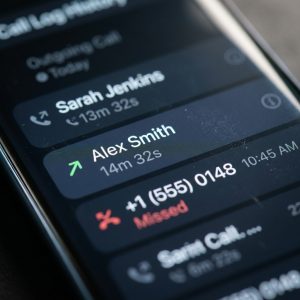
When you monitor your child’s call logs through a parental control app or by checking the phone directly, you see a list of every call, with the contact name or number, whether it was incoming, outgoing, or missed, the date and time, and the duration.
From this data you can answer the questions that actually matter:
-
Is someone calling your child repeatedly at late hours?
-
Is there a number you don’t recognize that appears frequently?
-
Is the child making very long calls to someone you haven’t heard of?
-
Are they receiving calls from international numbers that might be scam attempts?
Patterns are more useful than individual calls. A single call from an unknown number is probably nothing. A daily 45-minute call to the same unknown number over two weeks is worth a conversation.
Method 1: Check the phone’s built-in call log.
The simplest approach: pick up your child’s phone (with their knowledge) and open the Phone app. The recent calls list shows every call with the information described above.
This costs nothing, requires no app, and works on every phone. The limit is that you’re checking manually, so you only see what’s there at the moment you look. If the child deletes call entries (which is easy to do), you won’t see them.
For younger children (under 12), where you check the phone regularly, this is often enough. For teenagers who manage their own phone more independently, an automatic log is more practical.
Method 2: Google Family Link
Family Link doesn’t show call logs directly. It shows screen time, app usage, and location, but the call history isn’t surfaced in the parent dashboard. So if call monitoring is a priority, Family Link alone doesn’t cover it.
However, Family Link does let you manage contacts and restrict who can call the phone (on some Android devices). Check Settings, Digital Wellbeing, and Parental Controls, and look for call restrictions. The implementation varies by device manufacturer.
Method 3: How to monitor call logs as parents with SpyHuman
SpyHuman’s call recorder feature provides automatic call log monitoring: every incoming, outgoing, and missed call is logged to a parent dashboard with the contact name (if saved), number, time, and duration.
The logs are stored on the dashboard, so even if the child deletes a call from the phone’s call history, the monitored log retains it. You can review from any browser on your own device.
Call recording (audio capture) is an additional feature that can be enabled or disabled separately. If you’re in a jurisdiction where recording is legally uncertain for the other party on the call, leave recording off and use log monitoring only. The log gives you who, when, and how long, which is usually all you need for parental safety.
Setup is through the standard SpyHuman installation process. See the installation guide for the walkthrough. Tell your child the app is installed and what it monitors, as required by our Lawful Use Policy.
What about VoIP and app-based calls?
Traditional call-log monitoring covers standard phone calls (the ones that use the Phone app and the cellular network). It doesn’t automatically cover WhatsApp voice and video calls, Telegram calls, Skype, or other app-based calls, because those are handled by the app, not the phone dialer.
For WhatsApp calls specifically, SpyHuman’s WhatsApp monitoring logs call times and durations alongside message monitoring. See the WhatsApp tracker feature and how to monitor your child’s WhatsApp for the detail.
For other VoIP calls, coverage depends on the monitoring app. Most parental control apps focus on standard calls and WhatsApp. Calls made through less common apps (Telegram, Signal, Discord voice channels) may not be logged. If your child uses these for regular calls, it’s worth checking whether your chosen monitoring app covers them.
The “hidden call recorder” problem
I need to address this directly, because “hidden call recorder app” is one of the highest-volume search terms landing on SpyHuman’s feature page, and it’s the wrong framing for a parental tool.
“Hidden” implies the recording happens without anyone knowing. That’s the covert-surveillance framing that Google actively penalises, that regulators like the FTC have taken enforcement action against, and that SpyHuman’s Lawful Use Policy prohibits.
A parental call log monitor isn’t hidden. The child knows the monitoring app is installed. The purpose is safety, not secret evidence gathering. And the focus should be on call logs (who, when, how long), which give you everything you need for parental oversight, rather than on recording audio of every call, which raises legal complications and rarely adds useful information that the log didn’t already provide.
If you came to this page searching for a hidden call recorder, I want to be honest: that’s not what legitimate parental monitoring looks like, and targeting that intent is not something we do. For the full picture on what’s lawful, see is it legal to track a phone.
When call monitoring matters most
Certain situations make call-log monitoring especially valuable:
-
New social circles: When your child has a new phone and is starting to build their own social circle. The call log tells you who they’re talking to as those relationships form.
-
Behavioral changes: When you notice behavioral changes: withdrawal, secrecy about the phone, and mood shifts after calls. The log helps you see whether a specific contact correlates with the changes.
-
Harassment or threats: When your child reports harassment or threats from an unknown number. The log provides a record you can take to the police or the school. See am I being tracked for the full guide on handling unwanted contact.
-
Collaborative agreements: When you have a shared agreement with your teenager: “I can see who calls you and when, but I won’t listen to the calls unless there’s a genuine safety concern.” This kind of proportionate monitoring builds trust while keeping a safety net in place.
Reading the call log: India-specific tips
Indian mobile numbers start with 6, 7, 8, or 9 and are 10 digits long. If you see calls from numbers starting with +91 followed by 10 digits, those are standard Indian mobile calls.
Calls from numbers starting with other country codes (like +1, +44, +234, +92) are international. An Indian child receiving regular international calls from unknown numbers is a clear red flag, because scam rings and online predators often operate from international numbers to avoid easy tracing.
Calls from short codes (4 to 6 digits) are usually automated: bank OTPs, delivery confirmations, or service messages. These are normal and not a cause for concern.
Calls from landline numbers (starting with an STD code like 011 for Delhi or 022 for Mumbai) are often businesses or offices. A child receiving repeated calls from a landline in a city where they have no connections is worth a question.
The duration tells its own story. A 2-second call is a missed call or a dropped connection. A 30-minute call to the same contact every evening is a relationship, and knowing whether that contact is a school friend or an unknown adult matters.
Managing call access directly
Beyond monitoring, Android lets you restrict who can call the phone. On some devices with Family Link, you can set calling restrictions that only allow calls from saved contacts. This prevents unknown numbers from reaching the child entirely, which is especially useful for children under 12 who have no reason to receive calls from strangers.
On Samsung phones, the built-in call-blocking feature (Phone app, Settings, Block Numbers) lets you block specific numbers and all unknown callers. Combined with call-log monitoring, this gives you both prevention and visibility.
Frequently asked questions
Is it legal to monitor my child’s call log?
In most jurisdictions, yes. Call logs (who, when, duration) are metadata and monitoring them on a minor child’s device is broadly accepted as parental oversight.
Is call recording legal?
It depends on your jurisdiction. In one-party-consent areas, recording a call you’re a party to is generally legal, but recording someone else’s call is not. In all-party-consent areas, everyone on the call must agree. For parental recording of a child’s calls, the law is mixed. Check your local rules.
Can I see WhatsApp call history?
Standard call-log monitoring covers phone calls only. For WhatsApp calls, you need a WhatsApp-specific monitoring feature. SpyHuman covers both.
What if my child deletes calls from the call log?
If you’re checking the phone manually, deleted calls are gone. A monitoring app that logs calls in real time retains them on the dashboard regardless of deletion on the device.
Should I tell my child I’m monitoring their calls?
Yes. Open monitoring is lawful, effective, and maintains trust. Our Lawful Use Policy requires it.
Leave a Reply