
You typed a phone number into Google expecting a real-time GPS map location. Instead, you hit a paywall, an endless survey loop, or a sketchy site asking for your credit card details, leaving you wondering how to track a phone number location for free without getting tricked.
The idea of finding a secret phone tracker online is everywhere. Tech blogs offer quick hacks, and fake web portals advertise instant location results using just a phone number. Here is how cell location tracking actually works, what is completely fake, and how to monitor a device safely using legal, consent-based tools.
How to Track a Phone Number Location for Free: Is It Truly Possible?
Quick Answer: No. You cannot track a phone’s live GPS location for free using just a phone number without physical setup or account access. Online reverse lookup tools only reveal registered carrier details, line type, and city locations. Real-time GPS tracking requires explicit operating system permissions or active cloud account credentials.
Phone numbers sit in public telecom registries. A reverse phone lookup reveals carrier details, line type (VOIP vs. mobile), and the registered city or region. It will not show you where that phone is sitting right now.
To track a live location for free without someone knowing, you need access to the physical device or the primary cloud account attached to it.
Why Free Reverse Lookup Sites Do Not Show Live Locations
Free lookup sites pull from public database records. They scrape information from white pages, carrier prefix blocks, and commercial marketing data.
When a site claims it can ping a phone tower and show live GPS coordinates for free, it is running a script. These sites use fake loading bars to trick you into completing paid offers or downloading unwanted software.
| Method | Cost | Accuracy | Requires Device Access? | Shows Live Location? |
| Reverse Phone Lookup | Free | City/State Level | No | No |
| Built-In OS Tools | Free | Street Level (GPS) | Yes (One-time setup) | Yes |
| Cell Tower Triangulation | Restricted | Tower Range | No (Carriers/Police only) | Yes |
| Consent-Based Sharing | Free | Street Level (GPS) | Yes | Yes |
To understand how network signals and GPS chips talk to servers, read our detailed guide on how cell phone tracking works.
Built-In Free Tools That Work (And Their Catch)
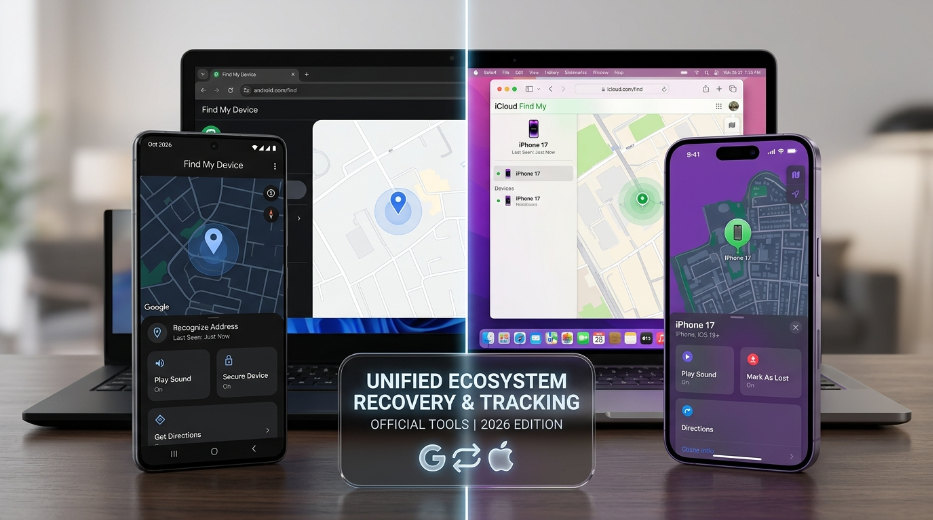
Apple and Google provide built-in location systems. They are accurate because they access the device hardware directly. They require physical access to set up, and they are not completely invisible.
Google Find My Device (Android)
Google allows users to track Android devices linked to a specific Google account.
-
Open a web browser and navigate to the official Google Find My Device portal.
-
Sign in with the Google account credentials active on the target Android phone.
-
The central dashboard displays the live GPS pin, remaining battery percentage, and active Wi-Fi network.
The catch: Google sends an automatic security notification directly to the target phone screen stating, “Device location located.” The phone owner sees this alert immediately.
Apple Find My (iOS)
Apple runs a similar tracking service across the iPhone ecosystem through iCloud.
-
Go to iCloud.com/find in any browser.
-
Log in using the Apple ID attached to the target iPhone.
-
Choose the target phone from the device drop-down menu to display its map pin.
The catch: If Two-Factor Authentication (2FA) is active on that Apple account, logging in triggers an instant 6-digit verification pop-up on the target iPhone screen. If location sharing is instead configured through Family Sharing, the user can inspect active viewers in their account settings at any time.
To find step-by-step setup guides for Android hardware, check out our tutorial on setting up Android monitoring software.
Common Scams and Myths to Avoid
The internet contains dangerous traps aimed at people searching for hidden tracker apps.
1. “Enter Number to Track” Web Tools
Websites that claim to pinpoint any phone number on a map without software installation do not work. They capture your IP address, harvest your email, or trick you into micro-charge SMS subscriptions.
2. WhatsApp Command Prompt Hacks
Popular videos claim opening Command Prompt on Windows and running a netstat command during a WhatsApp call reveals the recipient’s residential IP address. Modern messaging networks route audio through encrypted relay servers, completely hiding the user’s real IP address.
3. Malware Disguised as “Secret Trackers”
Downloading free third-party APK files or hidden tracking utilities from unknown forums exposes your hardware to malware. These payloads often carry spyware or banking trojans designed to steal your credentials.
Before installing unfamiliar software, check our breakdown on how to spot phone tracking scams.
Legal and Ethical Boundaries of Phone Tracking
Tracking an adult’s location without their explicit consent violates federal and state privacy statutes. Unauthorized location tracking can be classified as illegal surveillance or cyberstalking under regulations like the U.S. Computer Fraud and Abuse Act (CFAA), while mobile service location data is strictly protected under FCC Customer Proprietary Network Information (CPNI) rules. Additionally, the Federal Trade Commission actively penalizes data brokers that unlawfully harvest or trade precise geolocation data without clear user consent.
Legitimate location tracking relies on specific legal boundaries:
-
Parental Control: Legal guardians can monitor the location and digital activity of their minor children on devices owned by the parents.
-
Employer Asset Management: Organizations can track company-issued mobile hardware provided employees sign a written device monitoring policy.
Installing hidden apps on a partner’s or employee’s personal device can lead to criminal prosecution and heavy civil judgments.
For more details on compliance standards, review our legal disclaimer and terms of use.
Legitimate Alternatives for Location Sharing
If your goal is checking on family members or staying connected with friends, free, transparent tools provide reliable performance.
| Tool | Platform | Cost | Consent Requirement |
| Google Maps Sharing | iOS & Android | Free | Shared via App Settings |
| Apple Find My (People) | iOS | Free | Shared via iCloud Contact |
| Carrier Family Plans | Both | Paid | Account Owner Approval |
-
Google Maps Location Sharing: Open Google Maps on the phone, tap the profile icon, select “Location Sharing,” and share the real-time position with your account indefinitely.
-
Apple Find My Sharing: Open the Find My app on iOS, select the “People” tab, tap “Share My Location,” and send an invite to your account.
-
Carrier Family Plans: Cellular providers like Verizon, AT&T, and T-Mobile offer family location features built directly into monthly account plans.
If you require full mobile safety features for minor children, view our overview of parental monitoring solutions.
Deep Dive: How Cellular Networks & Tower Triangulation Work
Understanding why simple phone numbers do not stream live GPS location data requires looking at how cellular networks handle location requests.
When a mobile phone connects to a network, it pings nearby cell towers to maintain signal quality. Carriers calculate the phone’s location using methods like the following:
-
Cell ID (CID): Identifies the specific primary tower sector handling your connection. This offers a rough radius ranging from 500 meters up to several kilometers.
-
Time Difference of Arrival (TDOA): Measures the micro-delay in signal travel time across three or more nearby towers. This narrows the location down to a smaller geographical wedge.
Carriers store this data under strict security protocols. Under federal law, telecommunications companies cannot expose cell tower ping data to public websites or API endpoints. Only verified law enforcement personnel holding a legal warrant or emergency dispatchers handling active 911 calls can access raw network triangulation data.
Step-by-Step Setup: Setting Up Ethical Family Location Sharing
Setting up real-time location sharing with family members is straightforward when done transparently.
Option A: Setting Up Google Maps Sharing (Android & iOS)
Open Google Maps App ➔ Tap Profile Icon (Top Right) ➔ Select “Location Sharing” ➔ Tap “New Share” ➔ Choose Duration: “Until you turn this off” ➔ Select Contact & Send Link
-
Open the Google Maps app on the device you wish to track.
-
Tap the account profile icon in the upper-right corner.
-
Select Location Sharing from the menu options.
-
Tap New Share.
-
Set the duration to until you turn this off.
-
Select your primary Google account contact or phone number to send the location link.
Option B: Setting Up Apple Find My Sharing (iOS Devices Only)
Open “Find My” App on iPhone ➔ Select “People” Tab ➔ Tap “+” Icon / “Share My Location.” ➔ Enter Recipient Apple ID ➔ Select “Share Indefinitely”
-
Launch the Find My app on the target iPhone.
-
Choose the People tab along the bottom navigation bar.
-
Tap Share My Location (or the + add button).
-
Enter the phone number or Apple ID of your primary device.
-
Tap Send, then select Share Indefinitely to maintain continuous updates.
Technical Troubleshooting: Why Real-Time Trackers Fail
If legitimate sharing tools like Google Maps or Apple Find My stops updating coordinates, hardware-level bottlenecks are usually the cause:
-
Battery Saver Restrictions: Operating systems pause background GPS tasks to preserve power when battery levels drop below 20%.
-
Location Permission Revocation: System software updates may reset app permissions from “Always Allow” back to “While Using App.”
-
Stale Network Connectivity: Devices in low-reception zones or dead coverage pockets fail to transmit updated coordinates back to cloud servers.
-
Low Power Mode / OS Throttling: Android and iOS limit background data sync intervals for third-party tools operating in standby mode.
FAQs About Tracking Phone Numbers
Can I track a phone location using just the IMEI number?
No. Only telecom providers and law enforcement agencies can track phones using IMEI numbers. Commercial sites claiming to trace IMEI locations for a fee are scams.
Does dialing *#21# reveal if my phone location is tracked?
No. Dialing *#21# opens a carrier diagnostic screen showing conditional call forwarding status. It reveals if unanswered calls divert to voicemail, but it has no connection to GPS position data.
Can someone track my location if my phone is turned off?
No. When a phone powers off completely, its GPS chip, Wi-Fi radios, and cellular modems stop transmitting. A powered-down device cannot send live coordinates, though carriers can see the last cell tower ping before the device shut down.
Do free location tracker apps work without physical access?
No software can install itself on a target device remotely without manual intervention. Physical access is required to grant location permissions, adjust battery optimization, and approve system prompts.
How do I know if my phone is being tracked secretly?
Common warning signs include rapid battery drain, abnormal background data usage, warm device temperatures while idle, or random system reboots.
If you suspect unauthorized tools are active on your device, check our step-by-step instructions on how to detect phone monitoring tools.
Choosing Safe and Honest Solutions
Tracking a phone number location for free without someone knowing is simply not possible through a basic web search. Free lookup tools only show carrier details and registration regions. Real-time location tracking requires device permissions, cloud account credentials, or physical setup.
If you need to safeguard a child or keep track of family members, stick to built-in location options like Google Maps sharing, Apple Find My, or legitimate carrier family plans. Transparent tools avoid security risks, protect personal data, and ensure location updates stay active when you need them most.

Leave a Reply