
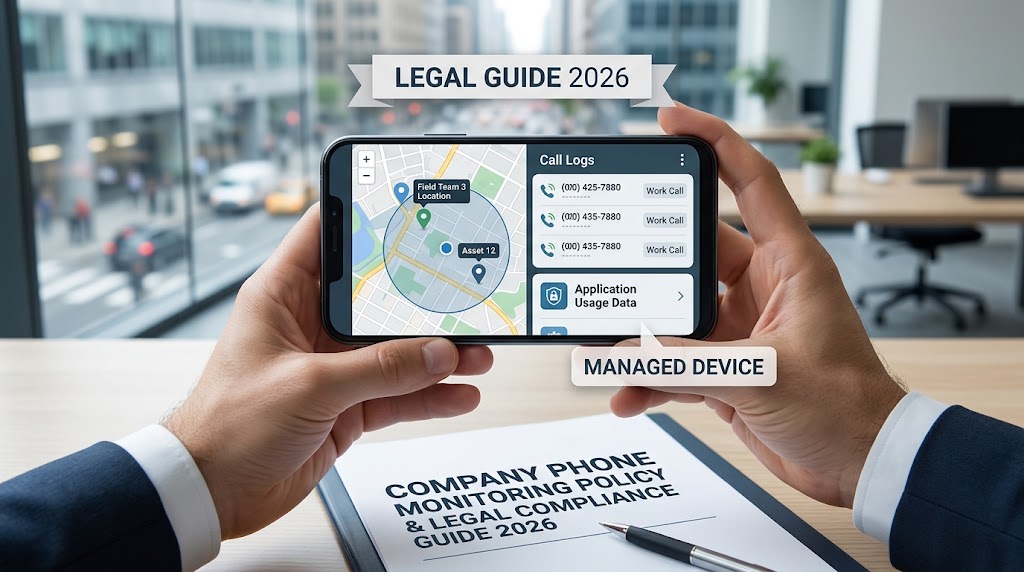
If your business gives employees Android phones for work, then employee phone monitoring can help you keep track of company devices, protect business information, and understand how those phones are being used.
But there’s a line you need to respect.
A company-owned phone doesn’t automatically give an employer unlimited access to everything an employee does. Monitoring should have a clear business purpose, and employees should know what is being collected.
The exact rules depend on where your business operates. Privacy, employment, and communications laws can vary between countries and states. In the UK, for example, the Information Commissioner’s Office (ICO) says worker monitoring must be lawful and fair. Employers should identify a purpose, collect only the information they need, and make workers aware of the monitoring.
So how should a business approach company phone monitoring in 2026?
Let’s break it down.
What is employee phone monitoring?
Employee phone monitoring means using software or business systems to collect information from a phone used for work.
The phone may belong to the company or be provided specifically for business activities. Depending on the software and the company’s policy, monitoring can include information such as
- GPS location
- Call logs
- SMS activity
- App usage
- Screen time
- Web activity
- Device information
- Installed applications
- Security-related events
- Company communication activity
A company phone tracker is usually focused on device location. A broader employer monitoring app can provide information about how the device is being used.
The right setup depends on what you’re actually trying to achieve.
If your goal is knowing where a delivery phone is during working hours, then location tracking may be enough. If you’re managing company Android devices and need a wider view of device activity, then a monitoring platform can make more sense.
The mistake is collecting everything simply because the technology allows it.
The ICO specifically recommends that employers choose the least intrusive method that can achieve the stated purpose.
Is employee phone monitoring legal?
It can be legal when it’s done properly.
There isn’t one universal rule that makes every form of employee monitoring legal or illegal. Your responsibilities depend on your country, state or region; the type of information collected; the purpose of monitoring; and whether the device is company-owned.
For example, UK employers dealing with worker monitoring need to consider UK GDPR and the Data Protection Act 2018. The ICO says employers must identify an appropriate lawful basis for processing employee information.
Consent can sometimes be relevant. But it isn’t automatically the right legal basis for workplace monitoring.
The ICO points out that genuine consent can be difficult in an employment relationship because employees may feel they don’t have a real choice.
That’s why your monitoring policy matters.
Before deploying an employer monitoring app, document:
- Why you are monitoring the phone.
- What information you collect.
- When monitoring takes place.
- Who can access the information?
- How long the information is stored.
- How employees are informed.
- How employees can raise questions or concerns.
For businesses operating outside the UK, check the laws that apply in your jurisdiction before starting monitoring.
This article is general information rather than legal advice.
What can employers legally monitor on company phones?
The answer depends on the monitoring purpose and local law.
Some forms of monitoring are easier to justify than others.
GPS location
Location tracking can make sense when employees use company phones for deliveries, field service work, transportation, or other jobs where location is directly connected to the work.
For example, a logistics company may need to know where a company-owned phone is during a delivery shift.
But continuous location tracking outside working hours creates a different privacy issue.
If employees take company phones home, then your policy should clearly explain when location tracking is active.
Call logs
Call logs can help businesses understand company phone usage.
An employer may need to review calls made from a company phone for billing, security, or business administration.
Call content is much more sensitive.
Recording calls can involve separate consent, interception, or telecommunications rules depending on where the business operates. Don’t assume that having ownership of the phone gives you permission to record every conversation.
SMS and messaging activity
SMS monitoring can expose personal information very quickly.
An employee might use a company phone to communicate with customers, suppliers, or colleagues. They may also receive personal messages.
Your policy should explain what the company monitors and why.
The narrower your purpose, the easier it is to explain the monitoring to employees.
App activity
An employer monitoring app can show which applications are installed or being used on a company phone.
This can be useful for security.
For example, a business may want to identify unapproved applications on company-owned devices.
It can also help IT teams understand whether a device is being used for business tasks.
But collecting detailed activity simply to watch employees can create unnecessary privacy concerns.
Web activity
Website and browser monitoring can help companies enforce acceptable-use policies or investigate security incidents.
Again, the purpose matters.
If you’re protecting company data, then monitoring suspicious web activity may have a clear business reason. Reading an employee’s entire browsing history without a defined purpose is much harder to justify.
Company-owned phones vs. personal phones
This is one of the biggest decisions a business should make before introducing phone monitoring.
A company-owned phone is easier to manage because the organization controls the device.
A personal phone used for work is more complicated.
Employees may use the same device for:
- Work calls
- Personal calls
- Family messages
- Banking
- Social media
- Personal photos
- Private browsing
- Business applications
Monitoring that device can expose information that has nothing to do with the business.
That’s why companies should be very careful with bring-your-own-device arrangements.
A written policy should explain what information is collected from a personal device and when monitoring applies.
For many businesses, separating work activity from personal activity is a cleaner approach.
How to set up employee phone monitoring legally
The technology is only one part of the process.
Your policy and internal procedures matter just as much.
1. Define the business purpose
The ICO recommends defining the purpose of monitoring before collecting employee information. Its guidance on monitoring workers explains how employers should consider necessity, fairness, and the amount of information they collect.
Start with one simple question:
Why do we need to monitor this phone?
Good reasons might include:
- Protecting company data
- Tracking company vehicles
- Managing field-service devices
- Recovering lost company phones
- Checking compliance with device policies
- Investigating a specific security incident
Write the purpose down.
The ICO says employers should define the purpose of monitoring and should not monitor workers simply “just in case.”
2. Decide what information you actually need
Don’t start by turning on every monitoring function.
Start with the business problem.
If you need location information then collect location data.
If you need to manage applications then focus on app activity.
If you need device security information then collect device-level information.
This follows the data minimisation principle. The ICO says employers should not collect more information than they need for the stated purpose.
3. Create an employee monitoring policy
Your policy should be written in plain English.
Explain:
- Which devices are monitored
- Which employees are covered
- What information is collected
- When monitoring occurs
- Why monitoring is required
- Who can access the data
- How long data is retained
- What happens when an employee leaves
- How employees can ask questions
- How monitoring changes will be communicated
Don’t bury the policy in a 40-page document nobody reads.
Employees should be able to understand what happens to their data.
4. Tell employees before monitoring starts
Employees should know that monitoring is taking place.
The ICO says employers must make workers aware of what personal information is being collected during monitoring and should keep privacy information up to date.
Give employees the policy before deployment.
If you change the monitoring system later then update the relevant information.
5. Check whether you need a DPIA
A Data Protection Impact Assessment, or DPIA, can help you identify privacy risks before monitoring begins.
Some types of employee monitoring can create a high risk to people’s rights.
The ICO lists examples such as keystroke monitoring, biometric monitoring and monitoring that could result in financial consequences for workers.
Even where a DPIA isn’t strictly required, documenting your decision can help show that the business considered the risks.
6. Limit access to monitoring data
Not everyone in the company needs access to employee monitoring information.
A small group of authorised people should normally handle sensitive monitoring data.
For example, location information might be available to an operations manager while detailed device records are restricted to authorised IT or security staff.
The fewer people with access, the easier it is to control sensitive information.
7. Set a retention period
Decide how long monitoring information needs to be stored.
Keeping every location record forever creates unnecessary risk.
If your business only needs recent location information for operational purposes then there’s little reason to retain years of historical records.
Set a retention period based on the actual business purpose and applicable legal requirements.
What features should an employer monitoring app have?
The best tool depends on your company’s needs.
For Android company phones, SpyHuman provides a range of monitoring functions from one dashboard. Its current product information includes call logs, SMS, GPS location, app activity, device information, and other monitoring tools.
You can review the complete list on SpyHuman’s Android monitoring features page.
For a business managing company phones, useful capabilities can include:
| Monitoring capability | Possible business use |
| GPS location | Field teams, deliveries, and company vehicles |
| Call logs | Business call administration |
| SMS monitoring | Company communication records were lawful |
| App activity | Device and application management |
| Browser history | Acceptable-use and security policies |
| Device information | IT inventory and troubleshooting |
| App controls | Restricting unapproved applications |
| Dashboard access | Centralized device management |
You don’t necessarily need every function.
Pick the tools that match your documented purpose.
How SpyHuman can be used for company phones
SpyHuman is an Android monitoring platform that can be installed on a compatible company-owned device with appropriate authorization.
Its current product information states that it supports Android 5.0 and above and requires one-time physical access to the device for installation.
The platform can then provide monitoring information through its online dashboard.
For a business, the most relevant functions will usually be device activity, location, and communication records.
SpyHuman’s cell phone tracker can show GPS location and location history from a monitored Android device.
Its device information page also lists device-level information alongside monitoring functions such as GPS, calls, SMS, and application activity.
Businesses should still configure monitoring around their actual policy.
A feature being technically available doesn’t automatically mean it should be enabled.
How much does business phone monitoring cost?
The cost depends on the software, number of devices, and features you need.
Some tools charge per device. Others use monthly subscriptions with different feature levels.
SpyHuman currently lists a free plan plus Premium at $17.99 per month. The premium plan includes unlimited records and additional monitoring features, while the free plan has limits on the amount of data available.
You can check the current plan details on the SpyHuman pricing page.
Prices and plan terms can change, so check the live pricing page before making a purchasing decision.
For a small company managing a handful of Android phones, the cost comparison should include more than the subscription price.
Consider:
- Number of devices
- Required monitoring features
- Data retention
- Setup time
- Employee training
- Administrative workload
- Support
- Legal review
- Data security
A cheaper tool isn’t necessarily cheaper once you factor in administration and compliance work.
Employee monitoring best practices
Good employee monitoring is narrow, explainable, and documented.
Here are the rules I’d use when setting up a company phone program.
Keep monitoring tied to work.
If the phone is being monitored for business reasons, then the monitoring should relate to those reasons.
For example, location tracking may make sense during delivery work.
Tracking an employee’s movements around their home at night is a different situation.
Don’t collect data “just in case.”
Every additional data point creates another privacy and security responsibility.
If you don’t need something, then don’t collect it.
Give employees a clear explanation.
Employees should understand what the company can see.
Avoid vague statements such as “company devices may be monitored.”
Be specific.
Tell employees what information is collected and when.
Review the system regularly.
Your monitoring needs may change.
A company that starts with location tracking may later decide it needs application management instead.
Review the policy and settings when the business purpose changes.
Protect monitoring data.
Monitoring information can be highly sensitive.
Use strong account security and restrict dashboard access to authorized staff.
You should also consider what happens if an administrator account is compromised.
Don’t let software make major employment decisions by itself.
Automated monitoring systems can produce inaccurate information.
The ICO advises that where monitoring information supports automated decisions about workers, meaningful human involvement may be required.
A monitoring dashboard can provide evidence.
It shouldn’t automatically become the final judge of an employee.
What about hidden employee monitoring?
This is where businesses should be extremely careful.
Covert monitoring means deliberately monitoring workers without telling them.
The ICO says covert monitoring is unlikely to be justified in ordinary circumstances. It may be considered in exceptional cases involving suspected criminal activity or serious misconduct, but strict conditions apply.
For normal company phone management, transparency is the safer route.
Tell employees about monitoring.
Document the purpose.
Limit the information collected.
Get appropriate legal advice when the situation involves sensitive data or an investigation.
SpyHuman’s own legal notice says the software should be used only in lawful circumstances and specifically refers to company-owned devices with the user’s knowledge and consent.
Common mistakes employers make
Monitoring personal phones without a clear policy
A BYOD phone can contain years of personal information.
Treating it like a company-owned phone can create serious privacy problems.
Recording calls without checking local requirements
Call recording laws differ between jurisdictions.
Check the rules before enabling recording.
Tracking employees outside work hours
A company phone may stay with an employee after their shift ends.
Your policy should explain when location monitoring applies.
Giving every manager access
Monitoring data should be restricted.
A manager doesn’t automatically need access to every message, location record or device event.
Keeping data forever
Set a retention period.
Delete information when you no longer need it unless a legal or documented business requirement requires continued retention.
Relying on the app instead of a policy
Software doesn’t replace company procedures.
Your monitoring system should support your policy rather than become the policy.
Employee phone monitoring vs. traditional device management
Businesses sometimes confuse monitoring with mobile device management.
They’re related but serve different purposes.
Mobile device management, often called MDM, is generally focused on managing and securing company devices.
That can include:
- Security settings
- Application deployment
- Device configuration
- Access controls
- Remote management
- Security policies
Employee phone monitoring focuses more on activity or information collected from device use.
Some businesses need MDM.
Others need monitoring.
Some need both.
Before buying anything, write down the exact problem you’re trying to solve. That usually makes the decision much easier.
A simple company phone monitoring policy checklist
Before activating monitoring on employee phones, check these points:
- The phones belong to the company, or the monitoring arrangement has been properly documented.
- The business purpose is clearly defined.
- The information collected is necessary for that purpose.
- Employees have been told about the monitoring.
- A privacy notice or monitoring policy is available.
- The appropriate lawful basis has been identified.
- A DPIA has been completed where required.
- Monitoring data is restricted to authorized users.
- A data retention period has been defined.
- Security controls are in place.
- Call recording requirements have been checked.
- Location tracking rules have been documented.
- Personal-device use has been addressed separately.
- Employees know how to raise questions or concerns.
- The policy is reviewed when monitoring practices change.
The ICO’s own monitoring checklist covers many of these areas, including necessity, DPIAs, lawful basis, privacy information, data minimization, and security.
Frequently asked questions
Can an employer track a company phone?
Yes, company phones can potentially be tracked when the monitoring has a lawful purpose and the employer follows the rules that apply in its jurisdiction. Employees should be informed about monitoring, and location tracking should have a clear business reason.
Do employees have to know their company phone is monitored?
The answer depends on local law and the circumstances. For ordinary workplace monitoring, transparency is the safer approach. In the UK, the ICO says workers should be made aware of how and what personal information is collected through monitoring.
Can employers monitor employee phones after work?
It depends on the monitoring purpose, device arrangement, and applicable law. Continuous tracking outside working hours can create privacy concerns, especially when employees take company phones home. Your policy should clearly state when monitoring operates.
Can an employer read text messages on a company phone?
Potentially, but access to messages raises significant privacy and data protection issues. The employer should have a specific lawful purpose and collect only information that is necessary for that purpose. Local communications and privacy laws may impose additional requirements.
Is GPS tracking legal for employees?
GPS tracking can be lawful in some circumstances, particularly when it has a clear business purpose such as managing field workers or company vehicles. The legality depends on jurisdiction, purpose, timing, and how the collected information is handled.
What is the best monitoring app for company Android phones?
The right choice depends on what you need to monitor. SpyHuman supports Android devices and provides tools for location, calls, SMS, application activity, and other device information. Businesses should compare the available functions against their monitoring policy before choosing a tool.
Final thoughts
Employee phone monitoring can be useful for companies that provide Android phones to their workforce.
The strongest setup starts with the business purpose.
Decide what you need to know. Tell employees what you monitor. Collect only the information you need. Restrict access and delete information when you no longer need it.
If you’re looking for an Android monitoring platform for company-owned phones, you can get started with SpyHuman.
For businesses considering SpyHuman, its current product documentation explains the available monitoring functions, Android compatibility, and plan options. Review those details alongside your company’s legal and privacy requirements before deployment.
If your monitoring involves sensitive employee information, personal devices, covert investigation or call recording, speak with qualified legal counsel in your jurisdiction before switching it on.



Leave a Reply